




Claims at your fingertips (East Region)
If you’ve ever felt unsure about how to submit a claims, you aren’t alone—and a few key tips can make the process much easier.
In most cases, your provider will file your medical claims for you. You’ll receive an explanation of benefits showing what TRICARE paid. In some instances, you may need to file your own claims. Those include:
- Services from non-network providers at a doctor's office
- Specialty pharmacy items given at a doctor's office
- Durable medical equipment and supplies
Find out more at Claims.
Searching for claim details? Here are two easy ways to find what you are looking for 24/7, or when you are on the go: the TRICARE East mobile app and the beneficiary self-service tool.
In the mobile app
Download the TRICARE East mobile app, if you haven’t already. (Visit the Apple App store or Google Play.)
After logging in, the home screen will show you recent claims and a section on referrals and authorizations. 
To see a full list, click on the blue “Show All Referrals” or “Show All Claims” text.
From there, you can view all items. For referrals, you can see date, status, order number, and type of service.
For more detail, tap on an entry to view it and see provider details and view referral and authorization letters.
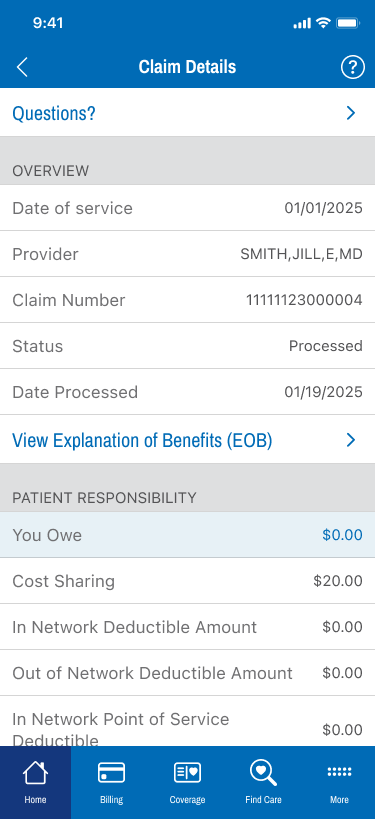
For claims, the details screen shows date of service, provider, date processed and patient responsibility—both amount owed and cost-sharing. You can also click through to your EOB.
In beneficiary self-service
Visit TRICARE East beneficiary self-service. After logging in, choose the beneficiary whose claims or referrals you want to see.
Scroll down to the referral and authorization section and click on an item in the list to view status, expiration date, requesting provider, the specialist who will perform the services, and more details.
For claims, from the home page, find the section above referrals and authorizations. You can view status and date of service. For processed claims, you can click the “View EOB” button to review specific details.
Visit the Apple App store or Google Play to download the TRICARE East app. Sign up for beneficiary self-service.
Claims processing may take up to 90 days from the receipt date.
For more information on claims, see Filing Claims, Completing the Claim Form, and Claims FAQs. For more information on referrals see Referrals and Pre-authorizations.
Last Updated 2/25/2026